Editor Remit
Restrict WordPress editors and authors to specific categories. Simple, focused, and enforced server-side so it cannot be bypassed. Completely free.
Per-User Control
Assign permitted categories to each user individually
Server-Side Enforcement
Restrictions cannot be bypassed via the UI or API
Block & Classic Editor
Works with both Gutenberg and the classic editor
Zero Configuration
Install, activate, assign categories — done
Category access, done properly
Editor Remit gives administrators precise control over which categories editors and authors can work in. Assign permitted categories to a user and they will only see, create, and edit content within those categories.
Restrictions are enforced server-side on every save — via the REST API for the block editor and via wp_insert_post_data for the classic editor. There is
no UI-only workaround.
Everything you need, nothing you don’t
All features included in the free plugin.
Per-User Restrictions
Assign any combination of categories to each editor or author. Users with no categories assigned are unrestricted — the plugin has no effect until you configure it.
Server-Side Enforcement
Saves outside permitted categories are blocked on the server via the REST API and classic editor hooks. UI filtering is a convenience layer — the server always has the final say.
Block Editor Support
The category panel in Gutenberg is filtered in real time to show only permitted categories. Non-permitted categories cannot be ticked and a notice is shown if one is removed.
Classic Editor Support
Fully compatible with the Classic Editor plugin. Attempts to save outside permitted categories force the post back to draft with a clear admin notice and a link to continue editing.
Restrictions Summary Page
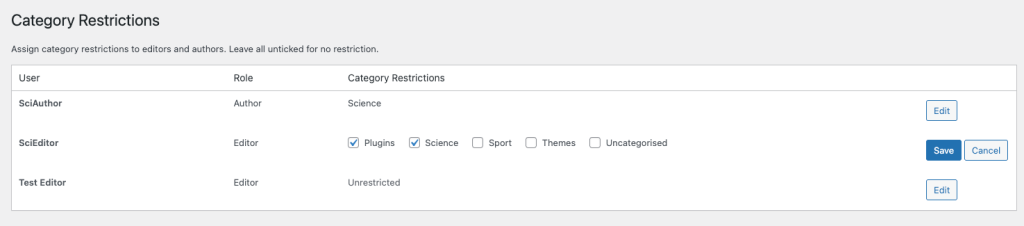
A dedicated page under Users > Category Restrictions lists all editors and authors with their current restrictions. Edit inline without leaving the page — no need to open individual profiles.
GDPR Ready
Integrates with WordPress privacy tools for personal data export and erasure. Plugin data is fully removed on uninstall.
Up and running in minutes
No complex setup required.
1
Install & Activate
Install Editor Remit from the WordPress plugin directory and activate it. No settings are required before you begin.
2
Assign Categories
Go to Users > Category Restrictions and tick the permitted categories for each editor or author. Leave all unticked to leave that user unrestricted.
3
Restrictions Apply
Restricted users immediately see only their permitted categories in the post list and editor. Saves outside their permitted categories are blocked automatically.
Requirements
WordPress
6.0+
PHP
7.4+
Version
See latest on WordPress.org
License
GPL v2
Ready to get started?
Download Editor Remit free from WordPress.org and have category restrictions in place in minutes.