DocVault
Intelligent document management for WordPress. Upload files, track version history, control access, and let visitors search your library from one place. Completely free.
Version Control
Full history with one-click rollback
Smart Search
AJAX-powered, instant results
Access Control
Public or logged-in access control
Download Tracking
Track downloads by document and version
Document management, done properly
DocVault adds a dedicated document library to your WordPress site. Unlike using the Media Library, each document is a proper item with its own version history, access settings, and download data.
Update a policy next month and existing links still work. Keep a clear revision trail and restore earlier versions when needed.
Everything you need, nothing you don’t
Core features included in the free plugin.
Version Control
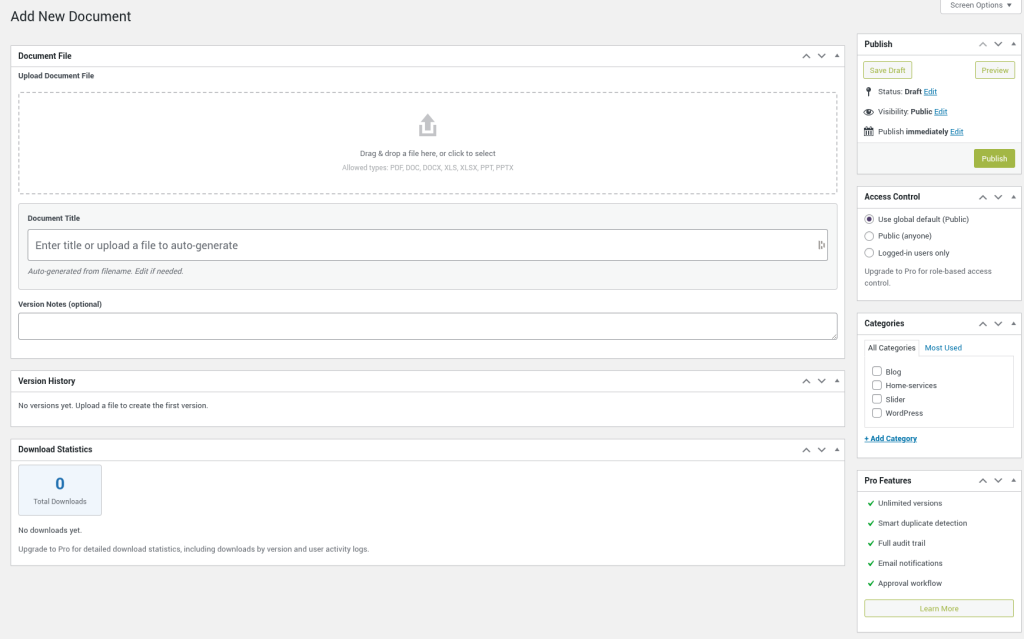
Upload a new version of an existing file and keep previous versions available for rollback. Free includes up to 5 versions per document.
AJAX-Powered Search
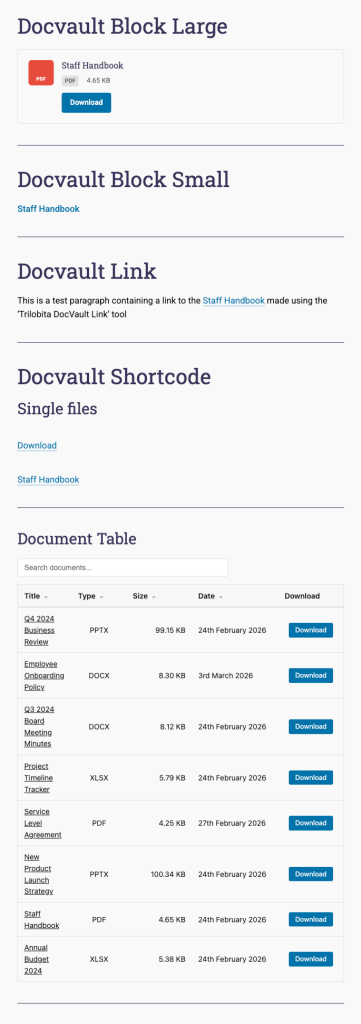
Visitors can search documents without reloading the page, with support for category and file type filtering via shortcode output.
Access Control
Set global or per-document access to public or logged-in users. Pro adds per-role restrictions and advanced permissions.
Download Tracking
Track document downloads and view counts in admin so you can see what content is being accessed most often.
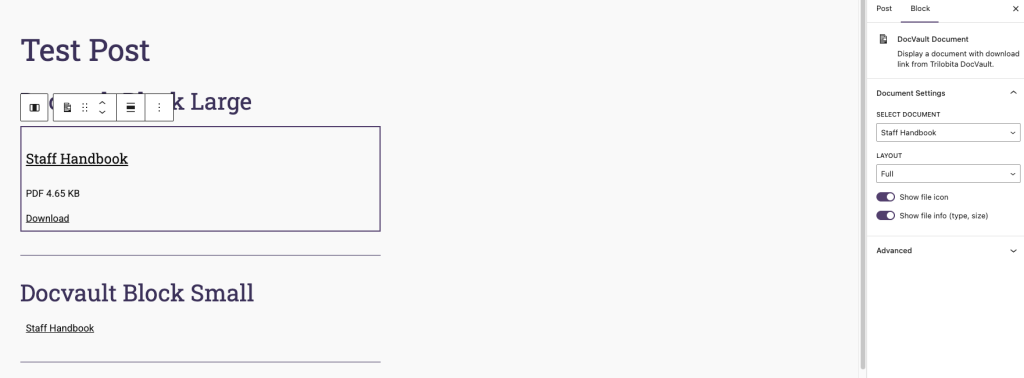
Gutenberg Block
Add your document library with a block, or insert document links inline from the editor toolbar.
GDPR Ready
Integrates with WordPress privacy export/erasure tools to help manage personal data requests.
Inline Document Viewing
PDF and image files open in a new browser tab without forcing a download. Other file types continue to download as normal.
Site Search Integration
Enable documents to appear alongside posts and pages in WordPress search results. Access restrictions are respected automatically.
Tags & Manual Sort
Tag documents for cross-cutting labels and drag them into a custom order in the admin list. Display that order on the frontend with orderby="menu_order".
Up and running in minutes
No complex setup required.
1
Install & Activate
Install “DocVault” from the WordPress plugin directory and activate it. A new Documents menu appears in wp-admin.
2
Upload Documents
Create a document, drag and drop your file, set access, and publish. Upload updated versions whenever needed.
3
Display on Site
Add the DocVault block to any page, or use [trdv_list]. Visitors get a searchable, sortable document list instantly.
Free vs Pro
Everything in Free, plus advanced workflow, governance, and scale features in Pro.
| Feature | Free | Pro |
|---|---|---|
| Core document management | ||
| Version history | Up to 5 versions | Unlimited |
| Drag and drop upload | Yes | Yes |
| Auto-title from filename | Yes | Yes |
| Document categories | Yes | Yes |
| Document tags | Yes | Yes |
| Document descriptions | Yes | Yes |
| Manual sort order | Yes | Yes |
| Admin file type filter | Yes | Yes |
| Frontend shortcode and block | Yes | Yes |
| Block layout options | Full, Minimal | Full, Minimal, Card, Button |
| Access, analytics, and workflow | ||
| Public / logged-in access control | Yes | Yes |
| Role-based access per document | — | Yes |
| Inline document viewing | Yes | Yes |
| Site search integration | Yes | Yes |
| Download count | Yes | Yes |
| Document expiry dates | Yes | Yes |
| Download analytics | — | Yes |
| Document approval workflow | — | Yes |
| Email notifications | — | Yes |
| Full audit trail with CSV export | — | Yes |
| Scale and maintenance | ||
| Smart similarity detection | — | Yes |
| Bulk upload | — | Yes |
| Duplicate detection and merging | — | Yes |
| Storage management | — | Yes |
| Dashboard widget | — | Yes |
| Compliance and support | ||
| GDPR compliant | Yes | Yes |
| Support | Community forum | Priority email |
Need the full technical breakdown? View every capability, file type, security detail, and requirement on one page.
Simple shortcode, powerful output
Add your document library to any page, post, or widget area with a single line.
[trdv_list]Displays all documents with search, sort, and pagination. Optional parameters let you filter by category, tag, or file type, control the sort order, show inline viewing, and more.
[trdv_list category="policies"]Filter to a specific document category.
[trdv_list show_tag_filter="true"]Show a tag dropdown filter alongside the search box.
[trdv_list orderby="menu_order"]Display documents in your custom drag-and-drop order.
[trdv_list per_page="5"]Show 5 documents per page.
Supported file types
PDF · DOC · DOCX · XLS · XLSX · PPT · PPTX · ODT · ODS · ODP · RTF · CSV · TXT
Requirements
WordPress
5.8+
PHP
7.4+
Version
See latest on WordPress.org
License
GPL v2
Ready to get started?
Download DocVault free from WordPress.org and get your document library live in minutes.