Post Pruner
Age-based post management for WordPress. Find old posts fast, spot content that has never been meaningfully updated, and edit, draft, set to private, or trash posts from one screen. Completely free.
Age Buckets
1 year, 2 years, 3 years, 4 years, and 5+ years
Published or Modified
Switch age view by created date or last modified date
Never Updated
Flag posts that were never meaningfully edited after publishing
Direct Actions
Edit, draft, private, or trash posts from one screen
Post maintenance, done properly
Post Pruner adds a dedicated review screen under Tools so you can see which published posts are ageing and act on them quickly.
Instead of sorting the default Posts screen over and over, you get fixed age buckets, sortable dates, a clear “Never updated” signal, and safe actions that keep cleanup focused and recoverable.
Everything you need, nothing you don’t
Core features included in the free plugin.
Fixed Age Buckets
Browse posts that are 1, 2, 3, 4, or 5+ years old, or view all posts older than one year at once. No setup required.
Sortable Dates
Sort by Published or Modified date so the oldest content, or the stalest content, rises to the top immediately.
Age Mode Toggle
Choose whether age is calculated from the published date or the modified date. Each user’s preference is remembered.
Never Updated Badge
Posts whose modified timestamp is within 8 hours of publishing are flagged as never updated, making forgotten content easy to spot.
Single-Post Actions
Edit, set to draft, set to private, or move a post to Trash directly from the list without leaving the screen.
Safe by Default
The free plugin uses Trash, not permanent deletion, so content review stays fast without becoming destructive.

Up and running in minutes
No settings page, no complicated workflow.
1
Install & Activate
Install “Post Pruner” from the WordPress plugin directory and activate it. A new Post Pruner page appears under Tools.
2
Choose Your Age View
Switch between Published date and Modified date, then open the age bucket you want to review.
3
Review & Act
Edit, draft, private, or trash individual posts directly from the table and work through ageing content efficiently.
Free vs Pro
Everything in Free, plus broader post-type support and workflow tools in Pro.
| Feature | Free | Pro |
|---|---|---|
| Core age-based review | ||
| Standard posts | Yes | Yes |
| Fixed age buckets | 1yr, 2yr, 3yr, 4yr, 5yr+ | Yes |
| Published / Modified age mode | Yes | Yes |
| Never updated badge | Yes | Yes |
| Single row actions | Yes | Yes |
| Expanded scope | ||
| Pages and custom post types | — | Yes |
| Bulk actions | — | Yes |
| Configurable timescales | — | Yes |
| Workflow and automation | ||
| Audit log | — | Yes |
| Scheduled pruning | — | Yes |
| Support | Community forum | Priority email |
Need the full technical breakdown? View installation details, requirements, and usage documentation in one place.
One screen, one workflow
Post Pruner is deliberately focused on one problem: reviewing old posts by age.
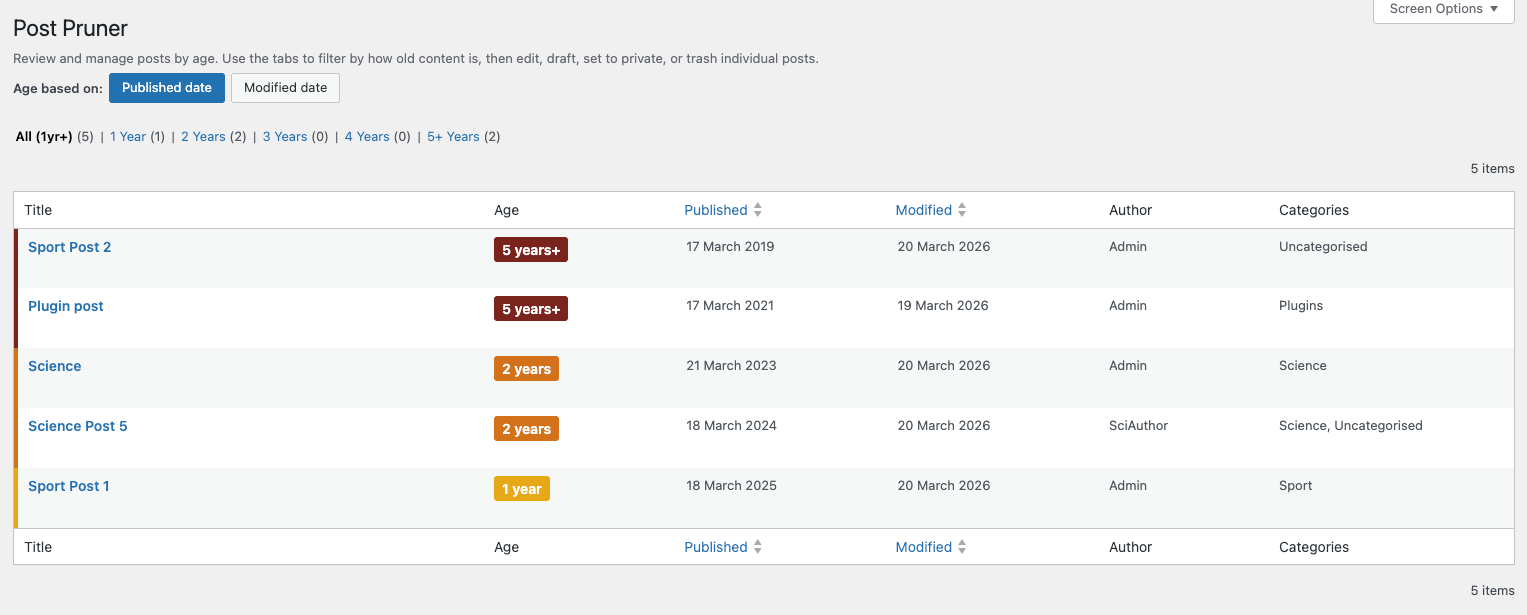
Open the Post Pruner screen, choose your age basis, filter by age bucket, and take action without leaving the table.
Who it’s for
Publishers · Editors · Content teams · Site owners cleaning up older content
Requirements
WordPress
5.8+
PHP
7.4+
Version
See latest on WordPress.org
License
GPL v2
Ready to get started?
Download Post Pruner free from WordPress.org and start reviewing old posts in minutes.