Release · DocVault 1.7.0, Pro 1.5.5 and Migrator 1.12.2 · 26 November 2026
DocVault 1.7.0, released on 26 November 2026, adds a Document List block: a searchable, sortable list of documents that you set up in the block editor instead of with a shortcode. It also fixes how old versions are deleted, and comes with updates to DocVault Pro and DocVault Migrator.
The Document List block
Until now, a list of documents meant adding the [trdv_list] shortcode and typing its options by hand. The new block does the same job from the block editor sidebar, with a preview of the list as you go.
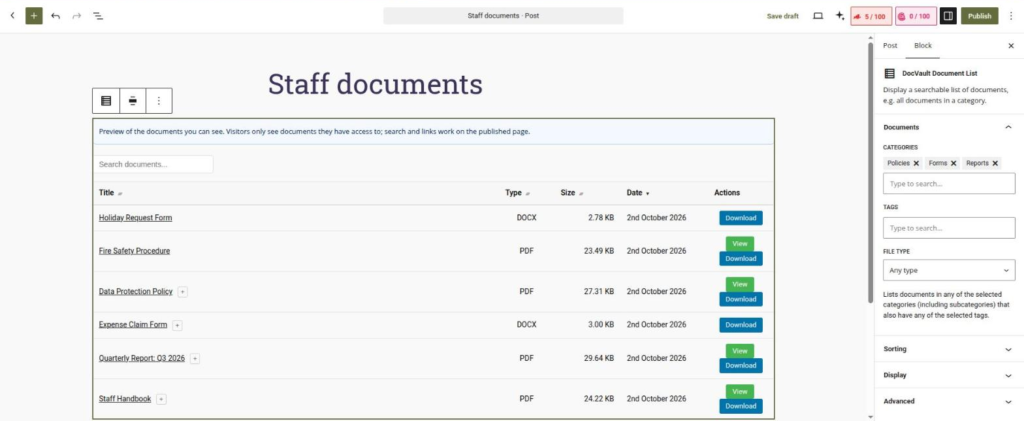
In the block settings you choose:
- Which documents to list: categories, tags and file type, for example every PDF in a Policies category
- How they are sorted: date published, title, manual order, file size, file type or downloads, and how many to show per page
- Which columns to show: Title, Type, Size and Date
- What visitors can use: a search box, category, tag and file type filters, view and download buttons, and a download count
Visitors only see the documents they are allowed to access, as with the shortcode, and the shortcode keeps working. To add the block, search for “DocVault Document List” in the block inserter. The documentation has the details.
Also in 1.7.0
- Deleting an old version, or the version limit removing the oldest one, no longer deletes a file that a later version still uses. This could happen after restoring a version, because the restored version shares the original’s file.
- The Date column in document lists now shows the document’s publish date, the date the list sorts by. It used to show when the current file was uploaded.
- Documents with the same date keep a stable order, so moving between pages no longer repeats or skips documents.
- Documents are left out of WordPress 7.2’s random content links, which would otherwise start the download of a random document.
- If your site has WordPress Download Manager or Download Monitor content that hasn’t been migrated, administrators see a dismissible notice about the free DocVault Migrator plugin.
The changelog lists every change.
DocVault Pro 1.5.5
DocVault Pro 1.5.5 is a security and data-safety update. Merging documents is refused when they have a different author, access settings, status or expiry date, so restricted files can’t become available through the merged document. “Add as version to…” no longer deletes the document you are editing, and version pruning and cleanup no longer delete files that are still in use. The Version and Downloads columns also work in the new block.
Merging, deleting versions and pruning need DocVault 1.7.0, so update DocVault and Pro together. See the Pro changelog.
DocVault Migrator 1.12.2
DocVault Migrator now needs DocVault 1.7.0 or later. Rolling back a migration no longer deletes files that another document still uses, and paid WordPress Download Manager packages are skipped instead of being migrated as free downloads. See the Migrator changelog.
Update
Update from Plugins in your WordPress admin as usual: DocVault first, then DocVault Pro and DocVault Migrator if you use them. New to DocVault? Download it free from WordPress.org.