WordPress can host files without any extra plugin: upload a PDF to the Media Library and link to it. For a handful of files, that’s enough. Once you have dozens of downloads, need to know how often they’re downloaded, or want to control who can get them, most people start looking for a “download manager” plugin.
We make DocVault, a free document library plugin for WordPress, so we’ll show where it fits, and be honest about where another type of plugin is the better choice.
That label covers some quite different tools. Here’s what they do, the main types, and how to choose.
What a download manager plugin does
Most download manager plugins do some of the following:
- Serve files through their own links instead of straight from
/wp-content/uploads/, so each download can be counted and checked. - Count downloads, and sometimes log who downloaded what and when.
- Control access, for example to logged-in users, certain roles, a password, or visitors who fill in a form.
- List files on your pages with download buttons, tables or a search box.
- Organise files into categories, and sometimes keep earlier versions.
The main types
Download managers
Plugins such as Download Monitor and WordPress Download Manager are built around download links and buttons, with tracking and access rules for each file.
According to its WordPress.org listing, WordPress Download Manager includes download logs, password and user-role protection, CAPTCHA protection and per-user download limits, and it can also sell files. Download Monitor tracks downloads, and its paid extensions add gated downloads (asking for an email address or a form before the file), advanced access rules and searchable document tables.
Good for: sites with lots of downloads, where counting, gating or protecting each file matters most.
Digital product stores
Easy Digital Downloads is built for selling files, with a cart, checkout and payments through Stripe, PayPal and others. If you charge for downloads, a store plugin is the right starting point rather than a download manager.
Good for: ebooks, software, templates and other paid downloads.
Document libraries
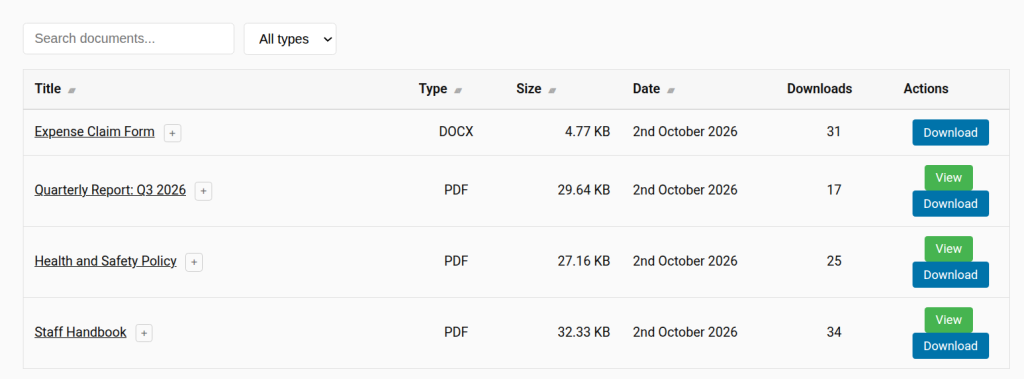
A document library treats each file as a document that can change over time: policies, forms, price lists, reports and minutes. Each document keeps one permanent link that serves the latest version, earlier versions are kept, and visitors get a searchable list. DocVault, our free plugin, is this type.
Good for: organisations that publish documents and need to keep them up to date and easy to find.
How to choose
- You want to sell files: use a store plugin such as Easy Digital Downloads.
- You want an email address before each download: use a download manager with gated downloads.
- You need password-protected files or per-user download limits: look at WordPress Download Manager.
- You publish documents that change, and visitors need to find them: use a document library with version history, such as DocVault.
- You only have a few files that never change: the Media Library is probably enough.
Where DocVault fits
If your downloads are documents that people need to find, and that change over time, DocVault does the job for free. It includes:
- A permanent download link for each document. Upload a new version and every existing link serves it.
- Version history, keeping up to five versions per document, with restore.
- A searchable, sortable document list with category, tag and file type filters, from one shortcode.
- A View button that opens PDFs in the browser.
- Access control: public, or logged-in users only, site-wide or per document.
- Expiry dates that hide out-of-date documents automatically.
- Download counts, and protection against direct access to the stored files.
It doesn’t sell files, password-protect individual downloads, ask for an email address first, or limit downloads per user. If you need any of those, one of the other types above is a better fit. DocVault Pro adds role-based access, unlimited versions, an approval workflow, an audit trail and download analytics showing who downloaded each version.
Install it from WordPress.org, upload a few documents and add [trdv_list] to a page, and you’ll have a searchable library in a couple of minutes.
Details of other plugins are from their WordPress.org listings, checked October 2026.